BenchKey

The repair shop OS

Run every repair from check‑in to cashed out

Tickets, live customer updates, estimates, invoices, payments, and the website widget that books the work, one system, built on a working bench, not in a boardroom.

Free 14-day trial · No credit card · Watch the 80-second tour →

app.benchkey.comREAL APP

The live queue. Every repair, status, and promise in one place. Click around, it is all the real app.

Born on a bench

BenchKey is built inside MDRepairs, a working data recovery company. It runs a real counter every single day.

Shipped because needed

Features ship when our own counter hits a real problem, not because a roadmap slide needed a box checked.

Proven before it ships

New features run at MDRepairs before they run anywhere else. If something doesn’t survive our front counter, it gets fixed before it reaches yours.

Everything the counter needs

One system for the whole shop

Stop stitching together a ticket app, a form builder, a text service, and a spreadsheet. BenchKey covers the job from the moment a customer finds you to the moment the receipt sends itself.

The queue is also a board

Drag the card. The customer gets the text.

Every status is a column. Dragging a repair to the next column is the status change, so the message wired to that status fires on the drop. There is even a full-screen mode for the TV above the bench.

app.benchkey.com REAL APP · RECORDED

Watch every recording of the real app →

Driven by AI

Software you can just talk to

BenchKey's AI assistant is on every screen, and it does the work, not just the chat. Tell it "text customers when their repair is ready and follow up with a review request" and it builds the automations, writes the messages in your shop's voice, and lists every change it made so you can check it and undo anything.

  • Configures statuses, automations, and templates from plain English
  • Answers "how do I" questions about your own setup
  • Summarizes tickets and drafts customer replies on the bench
How the AI works →
The BenchKey AI assistant setting up review requests and pickup texts from a chat conversation

The whole loop, hands off

From first click to five stars

Watch a repair move through BenchKey. Every message along the way sends itself, the instant reply, the quote, the receipt, the review ask. You fix the device; the system runs the conversation.

Instant reply sent

Lead captured

Website widget

Ticket created

One click convert

Quote text sent

Estimate approved

From their phone

Receipt sent itself

Invoice paid

Card, link, or Affirm

5-star review

Asked automatically

Live customer portal

Kill the “any update?” call

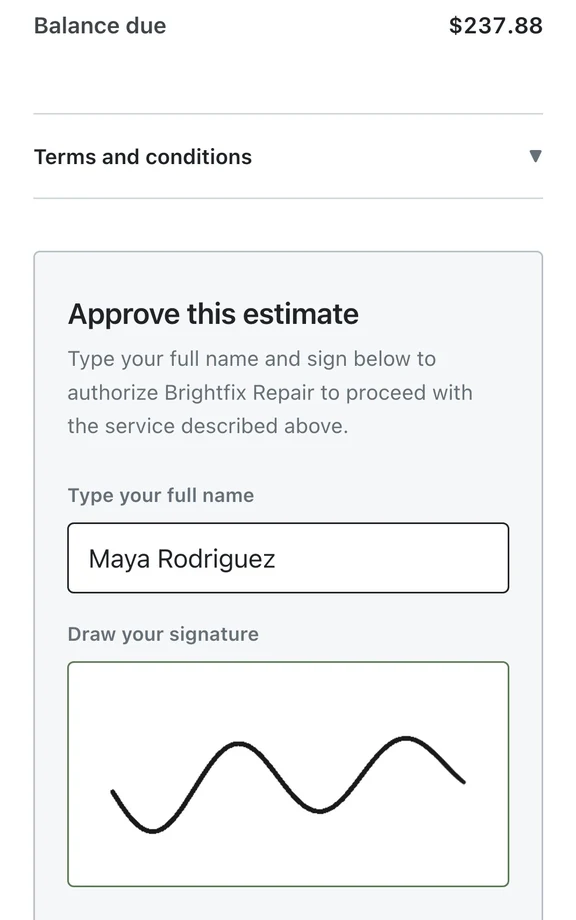
Every ticket gets a private link where the customer watches the repair move, received, diagnosed, approved, in repair, ready. They approve estimates and pay invoices on the same page. No app, no account, no phone tag.

  • Timeline updates itself as the ticket moves
  • You choose which notes and photos are visible
  • Estimate approval and payment on the same link
More on the portal →

Status tracker on every plan · two-way portal messaging from Pro

The real BenchKey checkout screen with line items and payment

Estimates → invoices → paid

Money that moves itself

Quote from the ticket, get a recorded approval, convert to an invoice, take the card, and the receipt emails itself with the PDF attached. Square at the counter, payment links by text, Affirm financing for the big jobs.

  • Approvals timestamped on the ticket
  • Receipts send automatically from every payment path
  • Reconciliation that checks every Square payment against its ticket and flags mismatches
More on payments →

Lead widget & pipeline

Your website should book repairs

One script tag puts a lead widget on your site. Every “how much to fix this?” becomes a lead in a pipeline with automatic follow-up that stops the moment they reply, and converts to a ticket in one click when they say yes.

  • Works on WordPress, Squarespace, anything
  • Follow-up sequences that stop on reply
  • Lead → ticket with history attached
More on lead capture →
The real BenchKey leads pipeline

Built for benches of every kind

Your trade, your workflow

The intake questions, timelines, and statuses adapt to what you fix, from water-damaged phones to clicking hard drives to band-season clarinets.

Switching is a CSV, not a project

Bring your history with you

Export CSVs from RepairShopr, RepairDesk, RepairQ, or your spreadsheets. BenchKey auto-maps the columns, previews before committing, and keeps customers linked to their tickets and invoices. And if anything looks wrong, roll the whole import back and run it again.

How the importer works →
  1. 01 Export CSVs from your old system
  2. 02 Auto-mapped columns, preview real rows
  3. 03 Import, relationships intact
  4. 04 Wrong? Roll it back, run again

FAQ

Fair questions

More in the docs, or email support@benchkey.com.

What is BenchKey?

BenchKey is all-in-one repair shop software: repair tickets with status automations, a live customer portal, estimates and approvals, invoicing and payments, lead capture, email & SMS, inventory, and more, one system for the whole counter.

What does the AI in BenchKey actually do?

It configures the system from plain English (statuses, automations, templates, review requests), answers questions about your own setup, summarizes long tickets, and drafts customer messages. You describe what you want; it does the clicking.

Who is BenchKey for?

Any shop that takes in items, fixes them, and gets paid: computer and phone repair, data recovery, jewelry and watch repair, instrument, small engine, e-bike and scooter, console, camera, drone, audio, and power tool repair. The workflows come from running a real counter at MDRepairs, a working data recovery company.

Can I switch from RepairShopr, RepairDesk, or spreadsheets?

Yes. Connect RepairShopr or RepairDesk directly with your own credentials and BenchKey pulls the data itself, or import CSVs from anything else. Everything previews before committing, customers stay linked to their tickets and invoices, and every import can roll back.

Do my customers need to download an app?

No. Every ticket gets a private portal link that opens in any browser, customers track their repair, approve estimates, and pay invoices with no account and no app.

How does pricing work?

Flat monthly plans by shop size, $29, $79, and $129, with unlimited tickets on every plan and founders launch pricing that locks the top two plans at $59 and $99 for life. Every plan starts with a free 14-day trial, no credit card, long enough to import your data and run real tickets.

Who builds BenchKey?

BenchKey is built inside MDRepairs, a working data recovery company. Every feature exists because a real counter needed it, and runs there before it ships to you.

Put your shop on BenchKey

Set up in an afternoon. Import your customers and tickets, build your check-in flow, and send your first live status link the same day.

Free 14-day trial · No credit card · Import from your old system

Founders pricing: the first 50 shops lock Pro at $59/mo for life · see pricing