Fleet asset tags
An asset tag distinguishes similar devices in a business customer's fleet. Staff can search that tag to find the right hardware.
Each identified device has a record of its repair visits. Earlier work is available when the hardware comes back, including devices brought in by a different customer. Business clients' fleets can be organized in the same way.
Included in Business
A serial number or IMEI identifies the device at check-in. BenchKey creates the asset record from the device information you save at intake.
When the same identifier appears at a later check-in, BenchKey can recognize the hardware and connect the new repair to its existing device record.
Previous repairs are available in the device record before you start another job. This history follows the hardware across repair visits.
Serial numbers and device identifiers tie the record to the hardware. Asset tags give staff another way to find it.
An asset tag distinguishes similar devices in a business customer's fleet. Staff can search that tag to find the right hardware.
Search by part of an IMEI, serial number or asset tag, or by make or model if those fields are filled in. Open a match for its Tickets and Invoices tabs.
Alongside earlier repairs, the device page shows invoice history so staff can see what was billed for work on that hardware.
Under a business customer's account, each asset has a separate device record and repair history.
Full device history for every customer is included on the Business plan.
Compare plans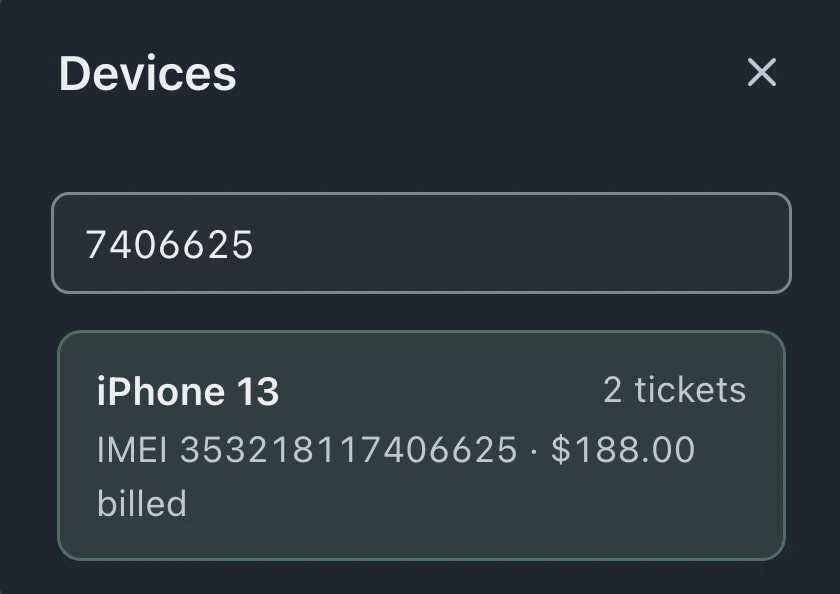
Intake information creates the device record. Capture the serial number or IMEI in the ticket so BenchKey can identify the hardware when it returns for another repair.
A matching serial number or IMEI can identify the same device even when another customer brings it in. Its earlier repair history remains available to staff, and check-in can flag the ownership difference for review.
Enter the part of the IMEI you have to find matching device records. Search serial numbers, asset tags and saved make or model fields, not check-in names.
Separate asset records give each device its own tag and history under the business account. Similar hardware can be tracked under the same customer account.
Leave your email for access updates. Your name and shop name are optional.
 Watch the product tour 3:34 Follow a repair from check-in to pickup in BenchKey