Keep access during key changes
A replacement keeps the same environment label and scopes. Keep the old key working for up to 24 hours while you update the connected tool.
On Business, choose which types of records each API key can read or change. Signed webhooks notify your server when a ticket changes status or an invoice is paid.
Included in Business
API and webhooks guideA key's details show its permissions and last use, alongside request counts, error rate and average response time over the last 30 days.
In Webhooks, select the events your tool needs, such as ticket status changes or paid invoices. Notifications go to your server's public HTTPS address.
The signing secret appears once when you create a webhook. Your developer uses it to verify the BenchKey-Signature header on incoming deliveries.
A new signing secret leaves the previous one valid for 24 hours. During that window, deliveries carry signatures for both while your developer updates the receiving server.
Manage key permissions and replacements, with documented limits and retry behavior for the tools your developer builds.
A replacement keeps the same environment label and scopes. Keep the old key working for up to 24 hours while you update the connected tool.
Revoking a key stops its access immediately. The key stays in the list below active keys, so you can still see it was revoked.
The Read-only button selects all read scopes without write access. Remove any your tool does not need to limit which record types it can view.
API keys and public API access are included on Business. Standard and Pro do not include API access.
Compare plans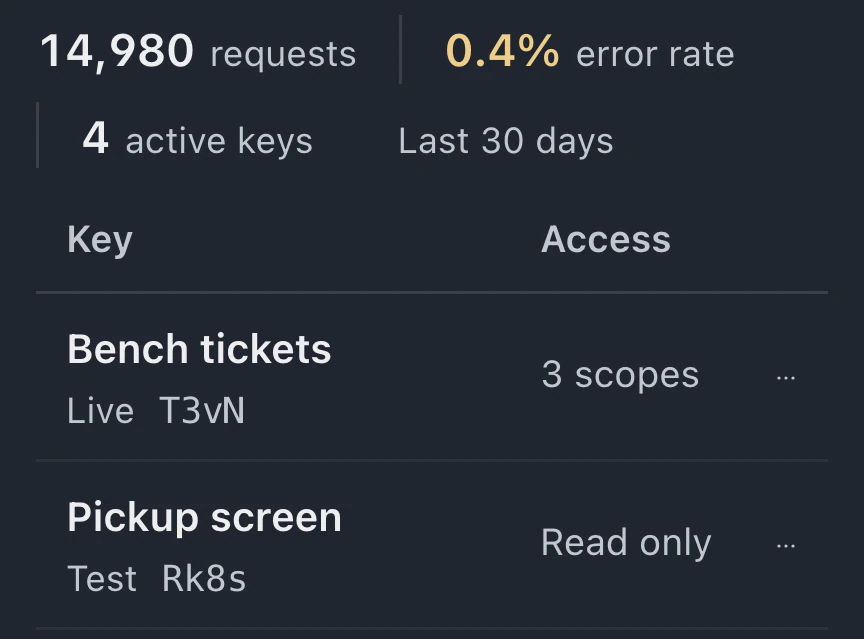
Business includes API access. Standard and Pro require an upgrade to create keys. The public API must also be enabled for your environment. The API reference covers authentication, supported endpoints and errors.
No. Test and Live keys read and change the same workspace's real data within their scopes. Use a separate workspace with fictional data for development, and read-only access when your tool only needs to view records.
Your server verifies the HMAC signature in BenchKey-Signature with the signing secret. Timestamps must be within five minutes of now. For 24 hours after rotation, deliveries include signatures for both secrets.
BenchKey tries each delivery up to eight times with increasing waits. The Deliveries log shows each status. A webhook older than seven days switches off if, in the last seven days, at least five deliveries gave up and none were delivered. Press Enable to resume; events while off are not queued.
Leave your email for access updates. Your name and shop name are optional.
 Watch the product tour 3:34 Follow a repair from check-in to pickup in BenchKey