Enter part costs
Type each part's name and cost into Parts, one row per part. On an unpriced estimate line linked to inventory, Calculate price opens with its name and cost.
Part costs, your markup and labor make up the repair quote. Customer price and margin appear together for review. Send the final quote with the cost breakdown kept inside the shop.
Calculator accepts a name and cost for each part. Additional rows cover the other components the technician needs.
Markup can be a percentage or fixed amount, with labor selected from a template or entered manually. Price, tax and margin update for review as you calculate.
Send estimate emails or texts the quote link right away. Texting from the business number requires a connected provider on Pro or Business.
Shared settings give staff a basis for each quote, with warnings when the result falls below your margin floor.
Type each part's name and cost into Parts, one row per part. On an unpriced estimate line linked to inventory, Calculate price opens with its name and cost.
Shop settings control quote rounding and the minimum margin. A warning appears when the calculated quote falls below that floor.
Authorized admins can add, rename, reprice or remove labor templates inside the calculator, where staff already select labor for a quote.
Pricing guidance appears in a team note below the result while staff decide what to charge.
Opened from a supported line item, the calculator can return the chosen price to the work you were editing.
Staff see the part costs, markup and labor alongside the result. They can review margin and tax before committing to a customer price.
The sent quote shows the final customer price. Your part costs, labor costs, markup and margin are left out of that message.
The calculator and email quotes come with Standard, Pro and Business; shop texting requires Pro or Business with a connected provider.
Compare plans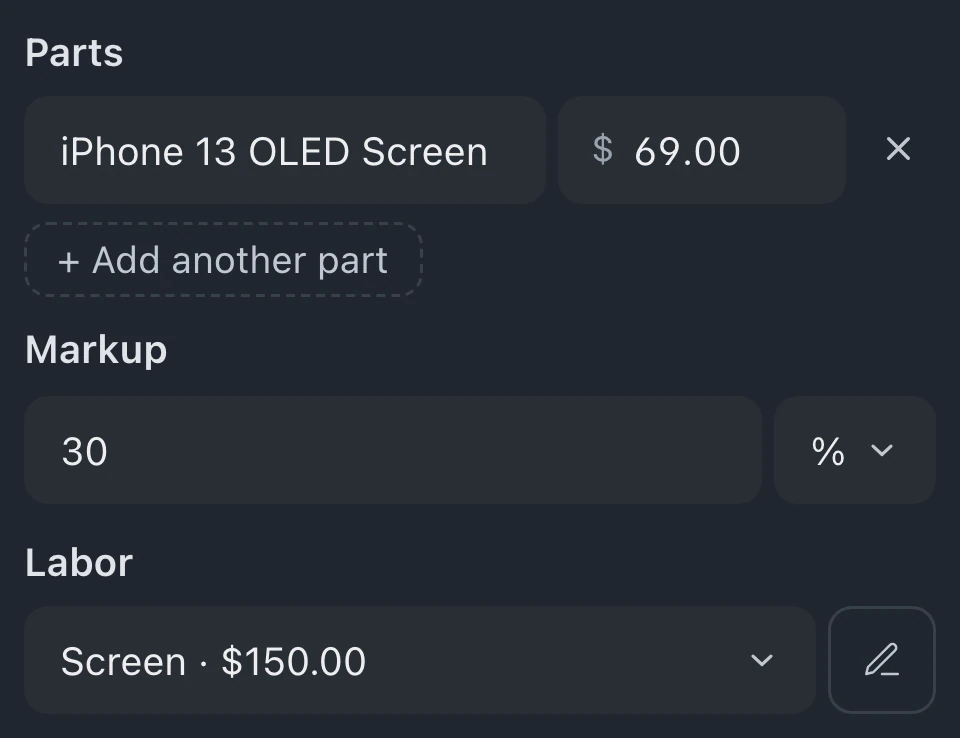
Manual entries let you type the part name and cost, then select markup and labor. Use + Add another part for each additional part.
Separate rows hold each part the repair needs. Their costs contribute to one quote with a shared markup and labor selection.
Customers receive the final price in the quote message. Part costs, labor costs, markup and margin are private, shown in the open calculator but not saved with the sent estimate.
Staff can use the available labor templates when calculating a quote. Editing those templates requires admin permission, so the ability to prepare a quote does not automatically permit changes to saved labor prices.
Leave your email for access updates. Your name and shop name are optional.
 Watch the product tour 3:34 Follow a repair from check-in to pickup in BenchKey