Keep a record of payment corrections in your shop
Understand the risks of editable payment history in a repair shop and how append-only records preserve a clear trail of payments, refunds, and corrections.
Joe Montanti
Open your shop software right now and find a paid invoice. Look at the payment on it. Is there an edit button? A delete?
If there is, check what happens to the original entry. Can staff review the amount first recorded, who recorded it and any correction? An edit that hides the original makes a discrepancy harder to investigate, even when the change was an honest mistake.
The theft you never see
Consider a fictional cash repair rung in on a busy Saturday. Someone removes its payment record and takes the cash. If the software keeps no history of the change, the drawer may appear to match the remaining entries. Preserving the recorded payment gives staff evidence to review when investigating a difference.
The same review matters for ordinary mistakes. A wrong payment method, a missed entry or a refund still needs attention. Preserved records help staff trace recorded changes; they cannot establish that cash was counted correctly or that every payment outside the system was entered.
The honest tech has the most to gain
Preserved payment records give staff and owners a shared starting point when the drawer differs from the report.
When the drawer comes up short, review the recorded payments, methods and corrections alongside the cash count. A wrong tender or a counting mistake is one possible explanation. The records give you something concrete to check with the people who handled the drawer, without assuming that the software has already explained the difference.
Keep the original entry available so the person reviewing the drawer can follow the correction.
Keep the original entry beside the correction
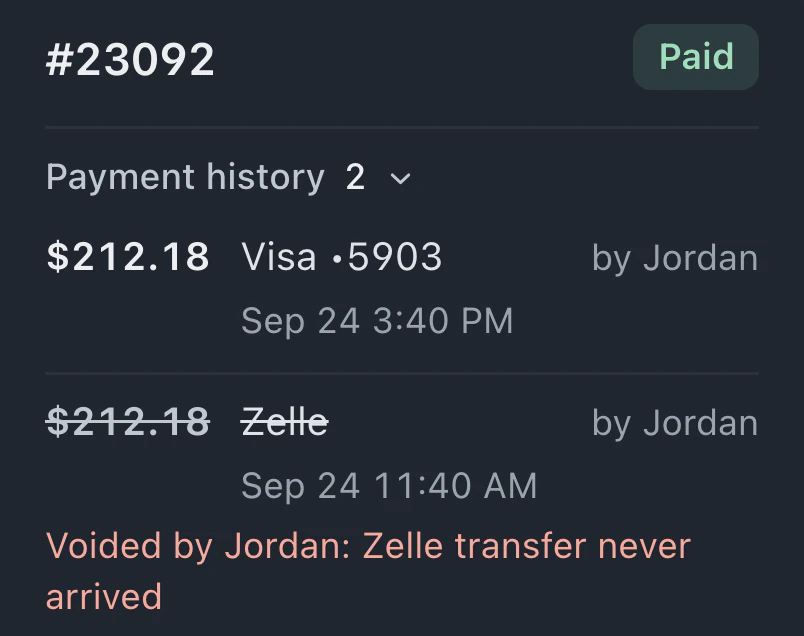
A correction should explain what changed. For a recorded payment, that means keeping the original and adding a linked reversing entry. Staff reviewing the repair can then see the recorded payment and the correction together.
Check that behavior when evaluating shop software. Make a correction and inspect the resulting history before relying on its reports.
What append-only looks like in practice
BenchKey preserves recorded payments and their corrections. It works like this:
- Recorded payments cannot be quietly edited or deleted. The original remains available for review.
- Corrections are new reversing entries. A refund points back to the original payment, so staff can review both records.
- Recorded amounts still need checking. Compare them with the cash count and provider records; preserving an entry does not establish that its input was correct.
- A paid invoice cannot be voided until its refund is on the record. Review the payment and refund before changing the invoice.
- Balances and reports follow recorded entries. Use them during reconciliation, and investigate differences from the cash or provider records.

“But I make mistakes at the counter all day”
Mistakes still need correcting. Keeping the original payment does not prevent a correction.
For example, imagine a repair payment that needs a partial refund because the part cost less than expected. Record the refund against the payment and review the remaining amount. The original payment and refund stay available together, so someone reviewing the ticket can follow the recorded correction.
Where it quietly pays you back
- End of day gives staff recorded entries to compare with the drawer count and review for differences.
- Your accountant can review payments and corrections alongside QuickBooks Online sync, when it is available and configured for the workspace.
- Dispute responses can use the ticket’s recorded payment history in a case file, subject to the processor’s evidence requirements.
- A new partner or store manager can review original payments and linked corrections when taking responsibility for another location.
A repair shop needs records its staff can inspect. Customers can review customer-facing repair updates, while staff review recorded payments and their corrections. Recorded payments cannot be quietly edited or deleted, and corrections remain new entries. Staff still check those records against the work and payments they handled.