AI repair shop software: what it should do
Evaluate AI for repair-shop setup, customer-message drafts, ticket summaries, and product questions, with clear provider requirements and human review.
Joe Montanti
Evaluate AI with the work your counter actually does. Ask it to help with a supported setting, draft an update from a ticket, and summarize a repair history. Check what it used, what it changed, and what still needs your review.
Supported settings changes
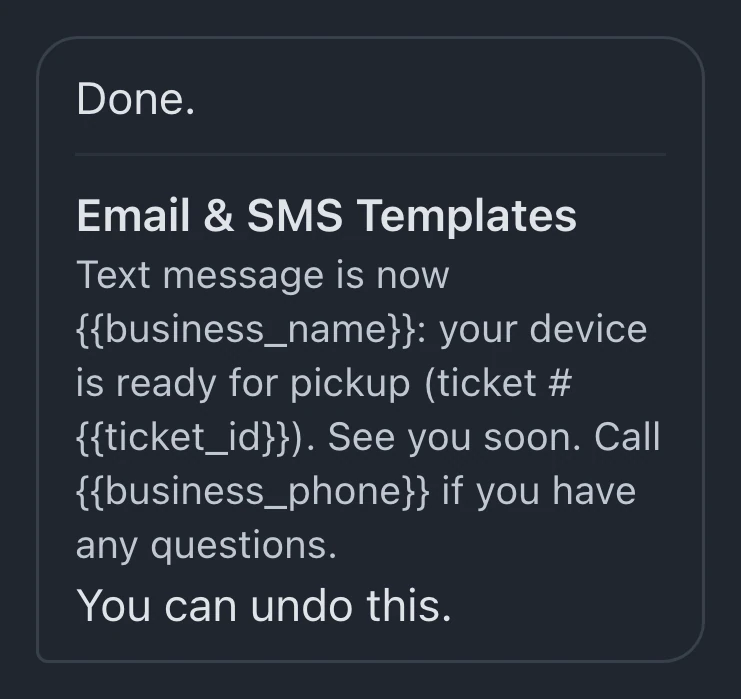
The difference between a help chatbot and a real assistant is one question: “text customers when their repair is ready.”
A help chatbot replies with a link to an article about notification settings. A real assistant does it: creates the automation, writes the message in your shop’s voice, and tells you exactly what changed so you can verify or undo it.
In BenchKey, the assistant supports changes across several setup areas. Statuses, automations, templates, business hours, intake forms, review requests: describe what you want, and the assistant configures it, then lists every change it made. Review the reply and open the affected setting to check the result. Requests remain subject to the available tools, plan, and permissions.
The same assistant answers questions about your configuration, not generic docs: “why didn’t ticket 23004 get a ready text?” gets checked against your actual setup.
Drafts and staff review
AI can help with repeated writing at the counter:
- Customer updates drafted from what actually happened on the ticket, status, notes, money, not from a generic template. You read, adjust a word, send.
- Ticket summaries gather recorded work and outstanding items from a long conversation. Check the summary against the ticket before answering the customer.
- Lead replies give staff a draft to review, including any requested price and booking link. Check those details before sending a reply to the lead.
- Intake categorization suggests a category when enabled. Queue routing requires a category-to-queue mapping, and the suggestion changes a saved ticket only when the workflow applies it.
For manual drafts, read the message, check its facts and price, and choose whether to send it. Configured widget auto-responses are separate: with AI replies and the channel enabled, they can send automatically. Email needs a configured sending channel; texts need a connected provider, an eligible number and customer consent.

Shop instructions for customer messages
Generic AI writes generic text, and customers can smell it. The fix is context: the assistant should know your business name, your tone, your policies, and your standing instructions (“always include the portal link, never promise a specific day”). In BenchKey those live as AI rules, so a one-tech watch bench and a five-counter phone store do not sound like the same template.
Data sent to AI providers
Check which provider receives the request and its relevant ticket context. BenchKey’s AI providers are not permitted to train on customer data. If you connect your own provider key, processing follows your shop’s agreement with that provider. Review those terms before connecting it.
Staff review and responsibility
Keep staff responsible for diagnoses, prices and customer commitments. Review manual drafts and setup changes, and check the channels and wording before enabling lead auto-responses. Use summaries to find the relevant record, then inspect it. Measure the results in your own workflow and keep reviewing the output.
If you want to see what that feels like, the AI assistant page shows the real thing, including the change log it leaves behind, or request access and try a supported setup request. When included platform AI is available, a personal key is optional; otherwise an administrator must connect a supported provider key. Setup assistance starts on Standard, while ticket and lead drafting and summaries require Pro or Business.