Plan your repair shop software migration
Plan a repair-shop software migration with source exports, sample imports, relationship checks, rollback review, and a clear cutover date.
Joe Montanti
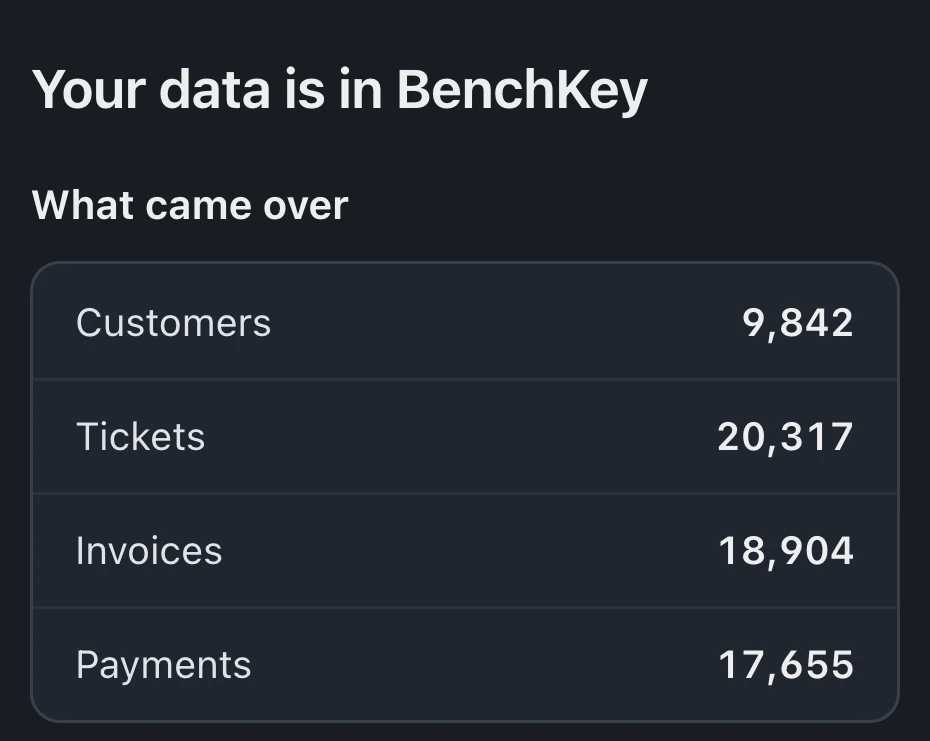
Ask a shop owner why they’re still on software they complain about weekly, and the answer is almost never the features. It’s the history. Five years of customers, tickets, and invoices feel like a hostage situation: sure, you can leave, but the data stays here.
That fear is mostly outdated. Here’s what switching actually looks like in 2026, and how to do it without betting the shop.
What you’re actually moving
Inventory the data that matters before you think about tools:
- Customers, names, phones, emails. The crown jewels, and the easiest part to move.
- Tickets, repair history per customer. Matters for warranty questions and repeat devices.
- Invoices, what was charged and paid. Matters for disputes and taxes.
- Inventory, parts and quantities. Nice to move, easy to recount if you have to.
- The relationships, this is the part people miss. A pile of customers and a pile of tickets is an archive. Customers linked to their tickets linked to their invoices is a history.
RepairShopr and RepairDesk connect directly, or you can import CSV or Excel exports. Check a small sample before bringing over the rest of your shop records.
The three failure modes (and the feature that prevents each)
Failure one: the column-mapping slog. Your old system calls it “Mobile”; the new one wants “Phone.” Two hundred columns of this and people give up. The fix is an importer with automatic column mapping that recognizes common export formats and lets you correct the leftovers, not a wizard that starts you from zero.
Failure two: discovering problems after committing. You import everything, then notice money values shifted, or every ticket landed unlinked. The fix is a preview of real rows before anything writes, so you’re approving evidence, not hoping.
Failure three: assuming Undo removes everything. Review the Undo limits before importing. In BenchKey, Undo can remove unused customer profiles the import created; existing, used, changed or shared profiles stay, along with used or moved stock. Imports that brought in invoices, estimates or payments can’t be undone. Changed or used imported tickets and later imports using the same customers can also block Undo. A small sample and a checked preview still matter.
Plan the migration and check the result
1. Export everything from the old system. Customers, tickets, invoices, inventory, as CSV. Keep copies, these files are your insurance regardless of what happens next.
2. Check a small customer sample first. Review the mapping and preview before saving the sample. Open the imported records and check names, phone numbers and emails before importing the rest.
3. Run the full import. Tickets, invoices, inventory. Then audit the relationships, not just the rows: pick five customers you know well and confirm their tickets and invoices hang together the way you remember.
4. Resolve import issues before rerunning. Read the import result and row report. Keep the source exports and resolve any unclear matches before changing the mapping and trying again.
5. Agree on a cutover time. Decide when new repairs start in BenchKey and keep the old system available for reference. Recording new work in both can create duplicate entry and reconciliation problems, so give the team one agreed place for new tickets.
Right before cutover, run the import again for new records, then revoke the token. Imported records are skipped. Choose one route for your tickets: a direct connection or files. Tickets imported through one route aren’t matched by the other. Invoices and payments come from one import source per shop. Unclear matches are listed for owner review, never merged.

The week after
Give your team time to practice the workflows they use most. Three useful preparation steps:
- Set up your statuses and automations before cutover, so the first Monday already feels wired.
- Put the check-in flow on a tablet day one. Intake is the habit that matters most.
- Send yourself a test portal link and review a sample invoice in a separate practice workspace. A test-labeled API key does not isolate data or prevent real payments.
And your old CSVs? Keep them securely under your retention policy and compare them with the imported results. That’s what leaving cleanly feels like.
The real cost of not switching
The history argument cuts the other way too. Every month on software that fights you adds another month of history to move later, and another month of intake minutes, update calls, and unsent receipts you’re paying for now. If the only thing keeping you is the data, the data was never the problem. The migration path was. Now there is one.
BenchKey’s importer suggests column mappings and previews records before saving them. Join the waitlist for access updates.
See the lead-capture demonstration for an example of the form and lead workflow, or browse the setup guides before planning the move.