

Warranty coverage & rework
When a repaired device comes back, find the original work before quoting another repair. BenchKey can recognize returning customers and hardware, while the original invoice and your shop’s warranty terms provide the context for the coverage decision.
How coverage is calculated
Section titled “How coverage is calculated”Set Warranty (days) under your business service terms. For each ticket, BenchKey uses:
- The ticket’s latest paid invoice as the start date.
- The configured warranty period as the length of coverage.
- The current date to determine whether the warranty is active or expired.
A ticket with no paid invoice or a shop with no configured warranty period has no derived coverage. The current check-in form does not show the older phone-based warranty banner.
Review the original repair
Section titled “Review the original repair”- Find the returning customer and open their earlier repair history.
- Identify the device and the original work, then review its latest paid invoice and your configured warranty period.
- Check the reported problem against your service terms before deciding whether the return is covered.
- Document the decision and reference the original repair number in the new work record.
Selecting a returning customer gives staff context; it does not itself approve a warranty claim.
Recognize the same hardware
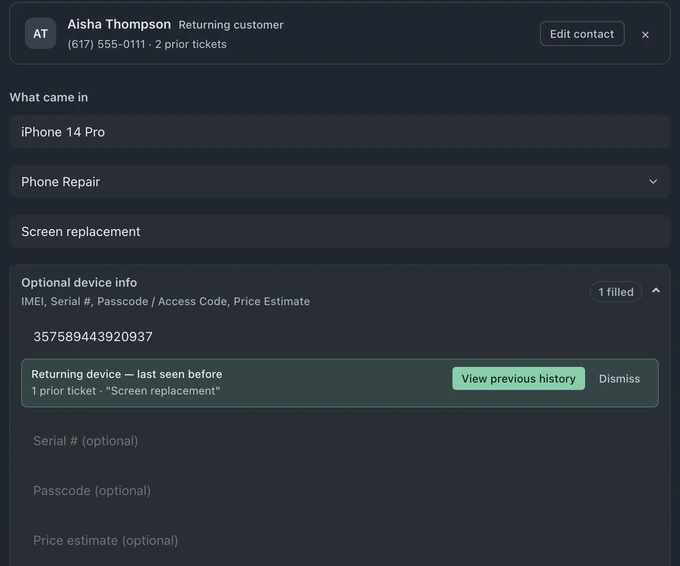
Section titled “Recognize the same hardware”Open Optional device info and enter the serial number or IMEI. When the identifier already belongs to an asset your shop has seen, the form can show:
- That it is a returning device
- The number of prior tickets
- The last reported service
- A link to view the earlier history
- An ownership warning when the saved customer differs
This check does not replace the customer record or silently merge histories. It gives the counter context before accepting the device.
Document a no-charge rework
Section titled “Document a no-charge rework”Use the normal check-in fields so the return is complete instead of becoming a vague note:
- Customer and store
- Device, category, and reported issue
- Serial, IMEI, and access code when applicable
- A $0.00 price estimate for a no-charge rework
- Queue assignment
- Internal notes that reference the original repair number and describe the retest plan
The resulting ticket keeps those details in its internal intake record and appears in the same queue as every other repair.
Formal claim records
Section titled “Formal claim records”BenchKey’s API supports a formal claim lifecycle for integrations and custom workflows:
- Open a claim only against an actively covered ticket
- Move open → approved or open → rejected
- Move approved → resolved or approved → rejected
- Link one rework ticket
- Store the reason, resolution notes, and snapshotted warranty expiry
See the Warranty claims API reference for endpoints, scopes, validation, and examples. The current intake screenshot shows returning-device context, not a claim approval or the removed warranty banner. Formal claim availability also depends on API access and workspace configuration.
See the complete Warranty coverage feature page.