

Import your data
You bring your history over yourself, in one of two ways: connect your old system directly (RepairShopr or RepairDesk) or import a file (any CSV or Excel (.xlsx) file, in any column layout). Both start in Settings → System → Migrate Data (owners and admins), and both show a preview before you start. Importing is included on every plan, imported tickets never count toward Standard’s 75 new tickets a month, and your old system is never changed: BenchKey only reads a copy. Paid Business includes We move your data for you and priority support during support hours. Trial accounts can also request migration help; confirm the scope and availability with support before relying on the service.
Import a customer spreadsheet, check the columns and store, and see what happens when you import the same file again. (1 min 30 s)
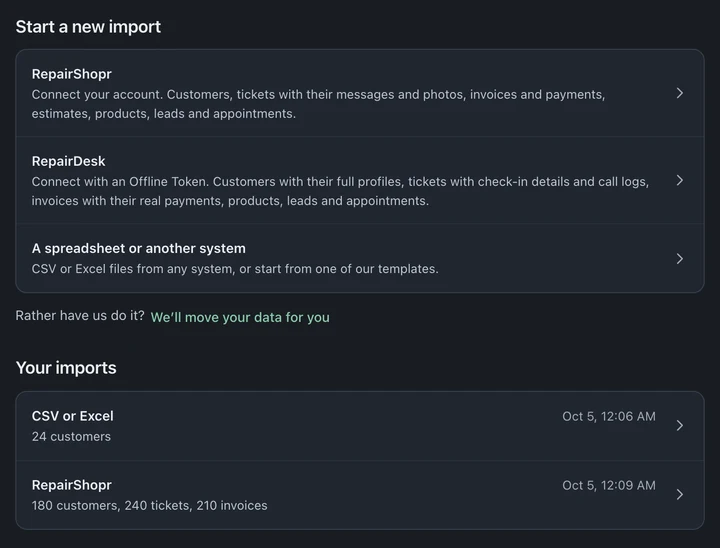
Coming from RepairShopr or RepairDesk?
Section titled “Coming from RepairShopr or RepairDesk?”Use the direct connection; it skips the export step and brings more over. The step-by-step guides show where to create the key each one needs:
- Switch from RepairShopr: a RepairShopr API token.
- Switch from RepairDesk: a RepairDesk Offline Token (the simplest way).
Your credentials are used for the import and nothing else. Revoke them in the old system once your final import is checked.
One store per import. A direct import from a RepairShopr or RepairDesk account with more than one store is refused before anything is written; BenchKey explains the one-store limit and the per-store file option. Export each store’s records from the old system and import each file separately, choosing the matching BenchKey store.
How long it takes
Section titled “How long it takes”Duration depends on record volume, ticket histories and attached files. RepairShopr and RepairDesk have shared reading limits, and your import may wait for other work before it starts. Check the import’s progress instead of planning around a fixed duration.
The import runs on BenchKey’s servers and saves its progress as it goes. You can close the tab and keep working; come back to Migrate Data to see where it is. A spreadsheet import avoids the old system’s API rate limits; its duration still depends on the records and waiting work.
Moving from another app
Section titled “Moving from another app”For Notion, Airtable, Google Sheets or Excel, export each table as a CSV file. In Notion, open the database as a full page and choose ••• → Export → Markdown & CSV, then Export. Unzip the download and use the CSV files. Free-form pages, including Notion notes pages, do not import; records need rows and columns. See Notion’s export instructions.
Files can contain customers, tickets, invoices, line items, notes, payments, estimates, inventory, time logs, leads and appointments. Ticket notes need a separate Notes file with Note text and a ticket number.
Excel sheets can have up to 25,000 data rows each. The file, total size and Undo limits below also apply when moving from another app.
Import a spreadsheet
Section titled “Import a spreadsheet”- Export a CSV or Excel file from your current system. BenchKey reads CSV, Excel (.xlsx), TSV and text files up to 25 MB each (Excel files two at a time). One import holds up to 20 files and 100 MB in all.
- In Settings → System → Migrate Data, choose A spreadsheet or another system. Under Where are these files from?, pick your old system if it’s listed, or leave Work it out from the files (choose My own spreadsheet for a sheet you made). Then use Choose files, or drop the files in.
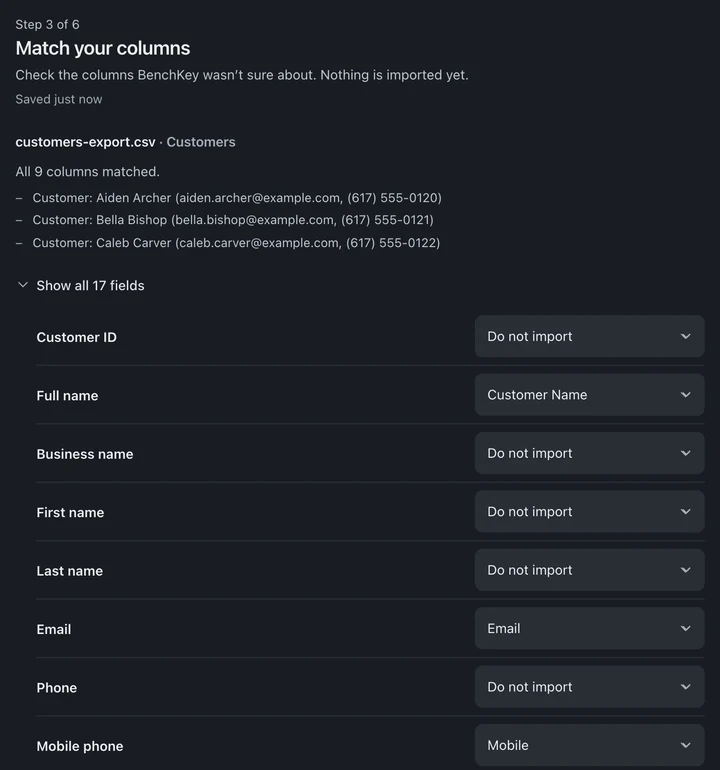
- In Check your files, review Imports as for each file. Match your columns appears only if a column needs a look; otherwise, open it with Check the columns first. BenchKey suggests a match for each column; fix anything it got wrong and map every required field. Columns that don’t fit a BenchKey field are named on screen. Their data won’t show in BenchKey; the rest of each row still imports. A required field with no column must be matched before you can start.
- Match your values appears when statuses or categories need matching. Choose what each means in BenchKey. The sample rows are on Match your columns. Look hard at dates and money columns; formats vary between systems.
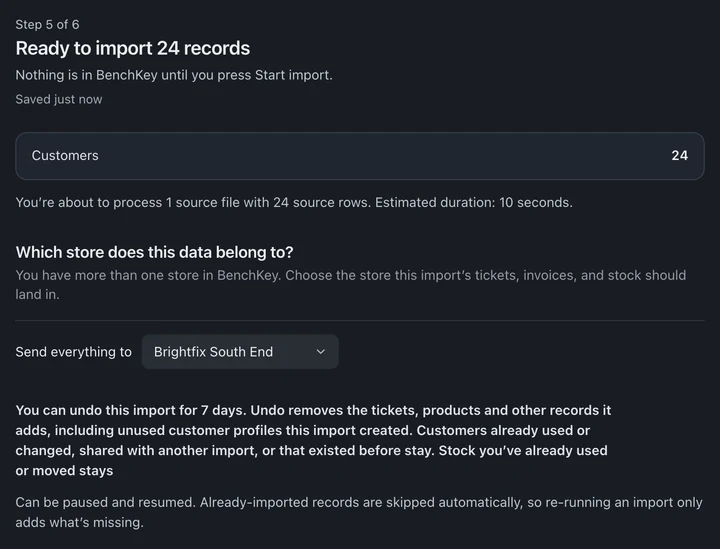
- Fix anything listed (Confirm N things to start → takes you there). If you have more than one store, choose where the records go under Which store does this data belong to?. Then press Start import.
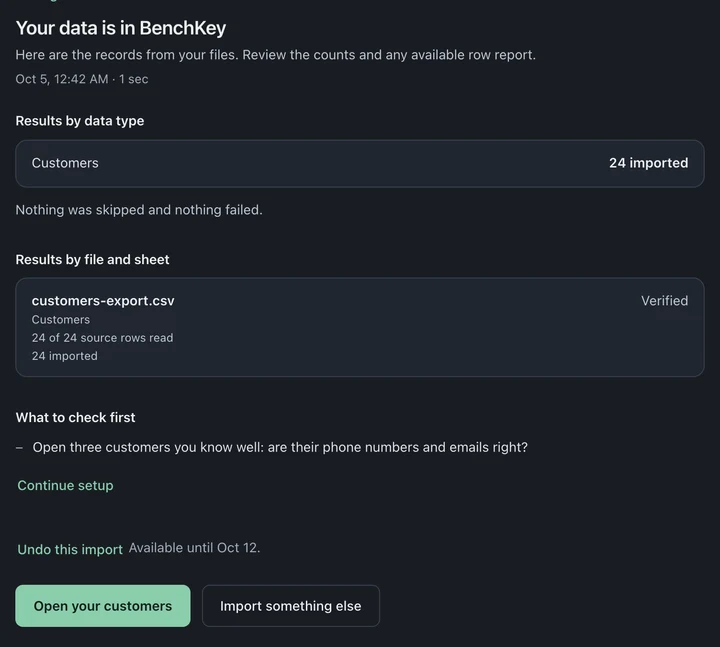
- When it finishes, open a few records you know well and check them.
AI suggestions (optional). On Match your columns, Optional AI suggestions → Suggest column matches can suggest where unusual columns belong. Only anonymous column IDs and broad value types are sent; your headers and cell contents stay in BenchKey. AI suggestions have a monthly allowance per shop; when it runs out, map the columns yourself (it takes a few minutes).
Read the result
Section titled “Read the result”The heading sums up the result, for example Your data is in BenchKey, Some of your data came over, Some of your data didn’t come over or Import didn’t finish, with counts for each kind of record. A repeat import with nothing new says Everything was already up to date.
- Download row report lists the rows that didn’t come over and why (up to 1,000; the screen tells you if there are more), plus notes on records that did come over.
- Fix and re-import starts a new import: correct the rows in your file, then add the corrected file (a file with just those rows is safest). Records BenchKey can recognize are skipped; unclear matches are listed for owner review rather than merged.
- Try again starts the import over: add your files again (or, for RepairShopr or RepairDesk, connect again). Records that already came over are skipped.
Undo an import
Section titled “Undo an import”Undo is a safety net, not a full reset. In Migrate Data, open the import under Your imports (or use the finished import’s screen) and choose Undo this import, then Undo import:
- It’s available for 7 days after the import finishes.
- It removes only records the import created that haven’t changed since.
- Undo also removes unused customer profiles, devices, categories and vendors that this import can be verified to have created. Customers already used or changed, shared with another import, or that existed before stay. Changed or shared records are kept and listed. Email and text opt-outs stay. Stock that was already used or transferred also stays.
- An import that brought in invoices, estimates or payments can’t be undone. An import with tickets can be undone only if none of its tickets has been changed or used since. If Undo can’t run, it says so and nothing is removed.
- Undo is also blocked if a later import still holds the same customers, or another import from the same account brought in tickets, invoices or other records for them. If a later import still holds the customers, undo that import first.
- You can’t reverse an Undo.
Check the column mapping and the preview carefully first, and start with a small file if you can. Then import tickets, invoices and inventory.
Tips from real migrations
Section titled “Tips from real migrations”- Keep copies of your export files somewhere safe, independent of any software.
- Check relationships, not just rows: pick five customers you know and confirm their tickets and invoices hang together.
- Cut over at a clean moment (end of week), not gradually. Running two systems doubles the work and halves the trust.
Repeating an import
Section titled “Repeating an import”Importing the same file again adds nothing. Records BenchKey can recognize are skipped: customers by email or phone, and tickets, invoices, estimates and payments by their ID or number. Rows with no ID of their own, such as time logs, leads and appointments, can come in twice from a new or edited file, so re-import only the rows you need or include their ID column. Invoices and payments come from one import source per shop. A later import from another source leaves them out and says so. Tickets brought in one way aren’t matched by an import the other way. Choose one route for your history: a direct connection or files. Unclear matches are listed for the owner to review rather than merged. Review the preview and check newly imported records. Typical uses:
- Right before your final cutover, run the import once more to pick up the last few days of tickets and invoices.
- After fixing rows from the row report, re-run with a file containing only the corrected rows and check them; records BenchKey can recognize are skipped.