

Invoices & payments
Create the invoice and handle payment in the repair ticket, with the customer, device, and conversation still in context.
Return money or void a payment recorded by mistake when the money never arrived. (1 min 8 s)
Creating invoices
Section titled “Creating invoices”- Open the repair ticket and open the Money panel using its icon at the right edge. Choose New invoice (owners and admins). You can also use Convert to invoice on an approved estimate.
- Review the line items, quantities, prices, discount, tax, and total.
- Select Create invoice for a new invoice. Find it under Invoices in the Money panel, with a count beside the heading.
Invoices use the same line-item editor as estimates. Converting an estimate carries its work into the invoice without retyping.
Add a discount
Section titled “Add a discount”In the estimate or invoice editor, find Discount. Choose a currency amount or %, enter the value, and review the updated total before saving. For an existing invoice, use its Edit action when available, then Save changes. Editing availability depends on the invoice state and your permissions.
See invoicing and payments for the invoice workflow.
Apply a previous payment
Section titled “Apply a previous payment”Record a deposit, apply it to the repair invoice, and collect the balance without counting the same cash twice. (1 min 23 s)
- Open the saved invoice in the ticket and select Apply previous payment (owners and admins). On narrower layouts, check the invoice’s More actions menu.
- Review the available payment’s customer, amount, method, and receipt. Choose the correct recorded payment and select Apply.
- Check the applied payment and the invoice’s reduced balance before collecting anything else.
Applying a previous payment links money already recorded. It does not collect that money again. Only the remaining available amount can be applied. Fully used or fully refunded payments have no available balance.
Collect the remaining balance
Section titled “Collect the remaining balance”Owners and admins record cash and other manual payments and send payment links; technicians can take a card payment on the shop’s reader. Open Record payment on the invoice to choose an available payment method. For cash, select Record cash…, review the remaining balance, enter the Cash tendered, and confirm the payment. Check the saved payment, any change due, and the invoice status afterward.
Cash tendered exceeds the balance, so Change due appears before confirmation and the saved invoice shows Paid. This recording uses fictional shop data in the real app.
Before taking payment
Section titled “Before taking payment”Choose the correct store and confirm the invoice total. Cash needs an open register drawer. Online payments need a working provider connection; counter card payments also need a compatible reader assigned to that location. Receipt delivery needs a valid customer email or phone and enabled message channels.
Ways to get paid
Section titled “Ways to get paid”- Card at the counter, processed through your connected Square or Stripe setup
- Payment link, text or email the link; the customer pays from their phone
- In the portal, the customer taps Pay now on the ticket’s portal page to open the invoice and pay it online
- Financing, with Affirm turned on (US and Canada shops only), customers can choose Pay with Affirm on large invoices and, if Affirm approves them, pay over time (big for data recovery and board-level work)
- Cash / external, recorded on the ticket for review alongside other payments
BenchKey adds no markup on payments, you pay your processor’s normal rates.
For a card dispute, open the repair ticket and choose Download Case File → Chargeback response. Review the PDF, then submit it through your processor before their deadline. See the case file guide.
Automatic receipts
Section titled “Automatic receipts”When an invoice is paid, enabled receipt channels can send:
- A receipt email with the invoice PDF attached
- An SMS with the receipt link
Review the payment-receipt event in Settings → Workflow → Statuses & Customer Messages. Delivery depends on the channel settings, provider connection, customer contact details, and consent. Confirm the payment and receipt outcome on the invoice; sending a payment link alone does not mark it paid.
Deposits and partials
Section titled “Deposits and partials”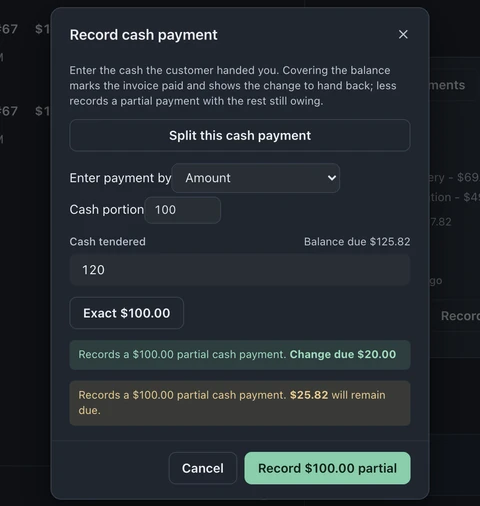
To take part of an invoice in cash, open Record payment → Record cash… → Split this cash payment. Choose Amount or Percentage of balance, enter the Cash portion, then enter the Cash tendered. Review the amount being recorded and change before confirming. The invoice stays partially paid until you collect the remaining balance.
If a deposit or payment was recorded separately, use Apply previous payment to link its available amount to the invoice. Check the applied amount and balance before collecting the remainder.
Reconciliation
Section titled “Reconciliation”The register feed shows the day’s recorded transactions. Reports → Reconciliation (Pro and Business; owners by default) matches Square payouts against the payments recorded in BenchKey and flags mismatches for review.
See invoicing and payments for creating invoices, applying recorded payments and collecting the balance.