

QuickBooks Online sync
Accounting sync is part of Pro and Business. BenchKey pushes your sales into the QuickBooks Online company your accountant already uses. The sync is one-way (BenchKey → QuickBooks Online), covers customers, invoices, payments and refunds, and uses duplicate-prevention checks plus a review queue for anything ambiguous.
For help with a previous accounting connection, contact support.
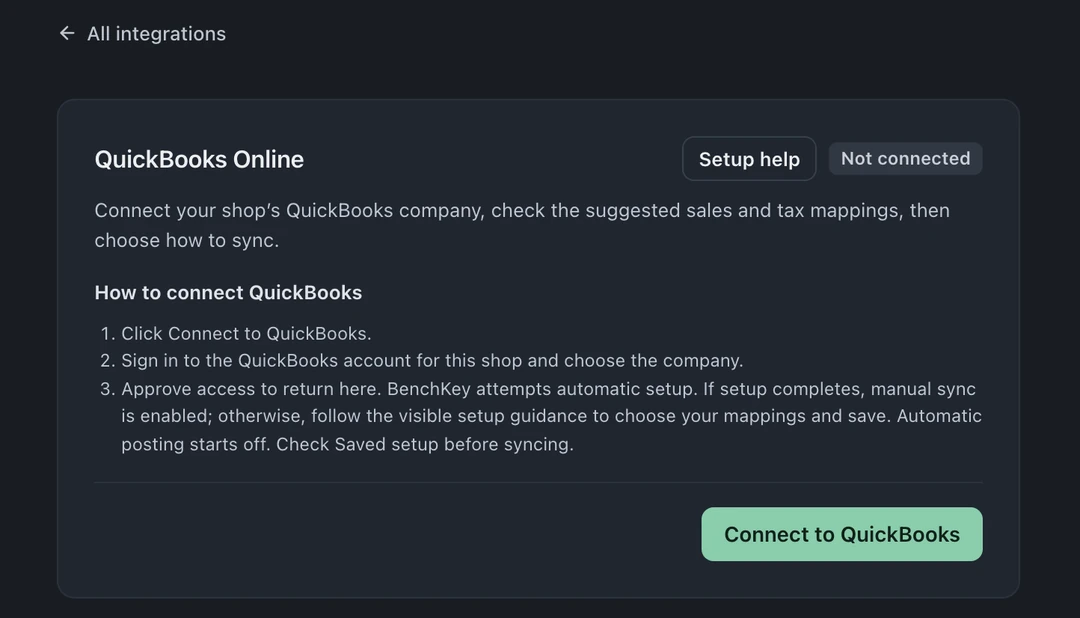
Connect
Section titled “Connect”- Open Settings → Integrations & Shipping → Integrations → QuickBooks Online.
- Choose Connect to QuickBooks, sign in to the QuickBooks Online account for your shop, choose the company and approve access. There are no keys to copy.
- You come back to BenchKey, which tries to set up the sales and tax mappings for you. If it can’t finish, the card shows what’s left to do.
Check where sales post
Section titled “Check where sales post”Open Setup and sync preferences in the QuickBooks Online card:
- Default QuickBooks item (required): the item your invoice lines post against. Pick it from the list.
- Default tax code (when needed).
- Advanced mappings are for your accountant and can stay as they are.
Automatic posting
Section titled “Automatic posting”Automatic posting turns on after successful initial setup. Review mappings and the saved preference; reconnecting preserves your choice. Eligible invoices and payments sync with their customer. Supported cash refunds post as refund receipts; chargebacks and settlement adjustments use journal entries.
For manual sending, turn automatic posting off. Choose an invoice in the QuickBooks Online card and select Sync to QuickBooks.
Duplicate prevention and review
Section titled “Duplicate prevention and review”This is the part that matters at reconciliation time:
- Every push is idempotent: each record carries a fingerprint, and an unchanged record re-pushed is a no-op. Retries, crashes mid-sync, and double-clicks post once.
- If an invoice’s math doesn’t reconcile to the cent (lines minus discount plus tax isn’t the total), BenchKey refuses to post it and flags it for review rather than corrupting your books.
- If something already synced is edited in BenchKey (a renamed customer, a changed payment), it waits in Needs review instead of being re-posted. You decide how it lands.
- Items in Needs review are never retried automatically. A person clears them, on purpose.
Disconnect or change plans
Section titled “Disconnect or change plans”Disconnecting clears the stored authorization immediately; reconnecting is the same sign-in. If your shop moves to Standard, the card says your plan doesn’t include QuickBooks Online sync; you can still review what synced and disconnect the company.
Existing accounting connections
Section titled “Existing accounting connections”Public setup instructions cover QuickBooks Online. For help with a previous accounting connection, contact support.
Does BenchKey import from QuickBooks Online? No. The sync is deliberately one-way, out of BenchKey. Your books are the destination of record, not a second editing surface.
Which plan includes accounting sync? Pro and Business. The 14-day trial runs on Business, so you can connect QuickBooks Online during a trial, subject to provider setup.