

Offline POS mode
Esta página aún no está disponible en tu idioma.
When offline mode is available for your workspace, cash, check, and other manual tenders can be recorded locally during an outage. The register queues those records for sync when its connection returns.
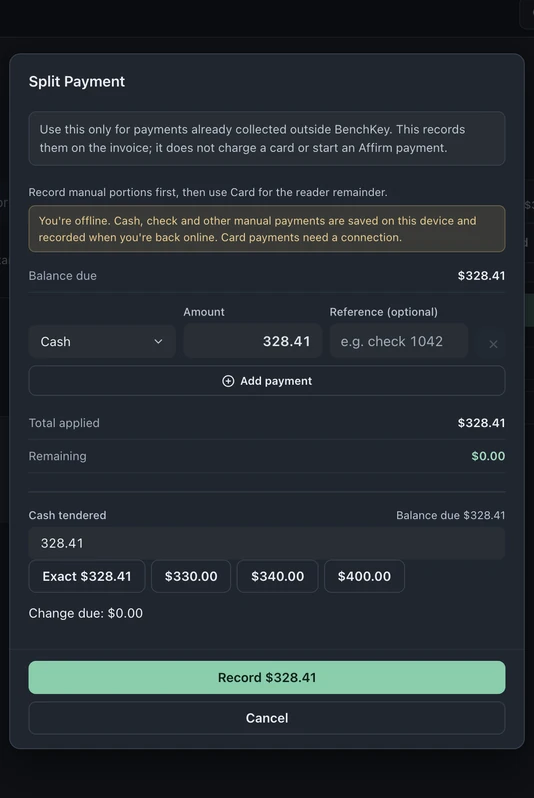
This capture shows the form before recording. It does not show a completed payment or a finished sync.
What works offline (and what doesn’t)
Section titled “What works offline (and what doesn’t)”- Works: cash, check, and “other” manual tenders through Checkout’s payment flow.
- Requires a connection: card-present, card-on-file, financing, payment links, and manual card records. Offline recording does not authorize a card payment.
BenchKey checks server reachability as well as the browser’s connection state before offering offline recording.
Taking a sale during an outage
Section titled “Taking a sale during an outage”- In Checkout → Customer lookup, find the customer and open the invoice. Choose Pay → Split payment (manual methods) and confirm that the offline notice is visible.
- Choose the manual tender and amount, then select Record only after collecting the payment. The record is stored on the register device with an offline confirmation.
- A running “waiting to sync” count stays visible until the queue clears.
The checkout screen itself survives a hard refresh mid-outage after the screen has been loaded online. The app shell is cached, and pending offline payment records are stored locally on that register until they sync. Keep the device and browser data available until the waiting-to-sync count clears.
When the connection returns
Section titled “When the connection returns”Queued records are retried when the connection returns, when the tab regains focus, and on a background timer. Each recorded payment carries a unique idempotency key so retrying that same record does not create a second payment. Keep the original browser data available, let the queue clear, and check the invoice and register activity before considering the sync complete.
Turning it on
Section titled “Turning it on”Offline mode is in beta and requires workspace availability. Contact support to confirm access and setup before relying on it during an outage. Manual cash payments also require an open drawer for the register.