

Follow-up sequences
Esta página aún no está disponible en tu idioma.
Sequences send scheduled follow-ups while staff check replies and handle the conversation. Review the timing and reply settings before enabling them. Follow-ups are part of Pro and Business.
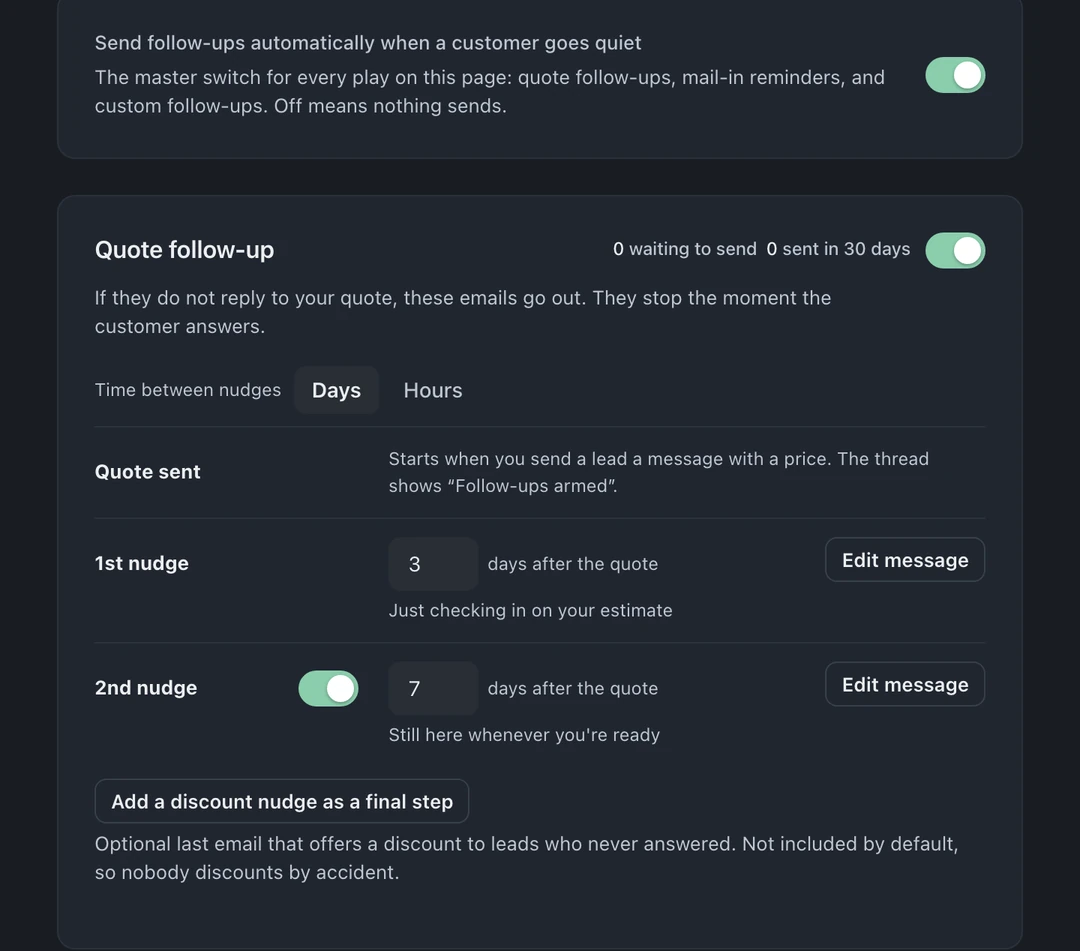
How follow-ups are organized
Section titled “How follow-ups are organized”Open Settings → Leads → Follow-ups. One page holds everything the system sends automatically when a lead goes quiet:
- Send follow-ups automatically when a customer goes quiet at the top turns all automatic follow-ups on or off. Off means nothing sends, and the page tells you so plainly.
- Below it live the plays, each one a day-based cadence you can edit:
- Quote follow-up: you sent a price and they went quiet. The example shows nudges on days 3 and 7. Choose Edit message for each nudge.
- Abandoned-form recovery: a visitor entered contact info, clicked Continue, then bailed before finishing; the saved partial gets a follow-up. (Email by default. The SMS option only ever texts visitors who checked the SMS-consent box.)
- Mail-in follow-ups (Business): the customer said they would ship and the box never came.
- Custom follow-ups: your own cadence for anything else.
Edit any step’s message inline, change the day offsets, and arm or disarm each play independently, the page shows how many leads are currently armed on each one.
Replies pause follow-ups
Section titled “Replies pause follow-ups”A customer reply by email or SMS pauses automatic follow-ups. The reply setting determines what happens after staff answer: the default resume mode schedules the next enabled, unsent follow-up; stop mode ends the current sequence. Check the next-send preview before replying. A new quote can start a new sequence even in stop mode. Closing, archiving, or converting a lead is separate from this reply setting.
Mail-in follow-ups
Section titled “Mail-in follow-ups”On Business, mail-in tickets get their own cadence for the shipping gap: confirmation at day 0, a “haven’t seen the package yet” nudge if nothing arrives by day N, arrival confirmation when it lands. Remote customers should never wonder if their package vanished.
Writing advice
Section titled “Writing advice”- One idea per message; the goal is a reply, not a brochure.
- A day-2 follow-up is one example cadence to adjust for your shop. Keep the message focused on one link and one next step.
- Read your sequence out loud as if you’re the customer. If a step would annoy you, cut it. Three good messages beat six mediocre ones.