

The website widget
Este conteúdo não está disponível em sua língua ainda.
The lead widget lets customers contact your shop from your website. Add its script to a site that supports custom JavaScript. See the lead-capture demonstration for an example of the form and lead workflow. The lead widget and Leads are part of Pro and Business.
Installation
Section titled “Installation”- Open Settings → Leads → Widget Settings and copy your embed snippet (it includes your shop ID):
<script src="https://app.benchkey.com/widget/lead.js" data-tenant="YOUR_SHOP_ID"></script>- Paste it before the closing
</body>tag of your website. It works anywhere you can add a script tag, including WordPress, Squarespace, Wix, and hand-written HTML. - Reload your site: the chat bubble appears bottom-right with your branding.
Make your own buttons open it
Section titled “Make your own buttons open it”Any existing element can open the widget, add one attribute:
<a href="#" data-que-open>Get a Free Quote</a>Your hero button, your nav link, the banner on your pricing page, all of them can trigger the same form.
Configuring the form
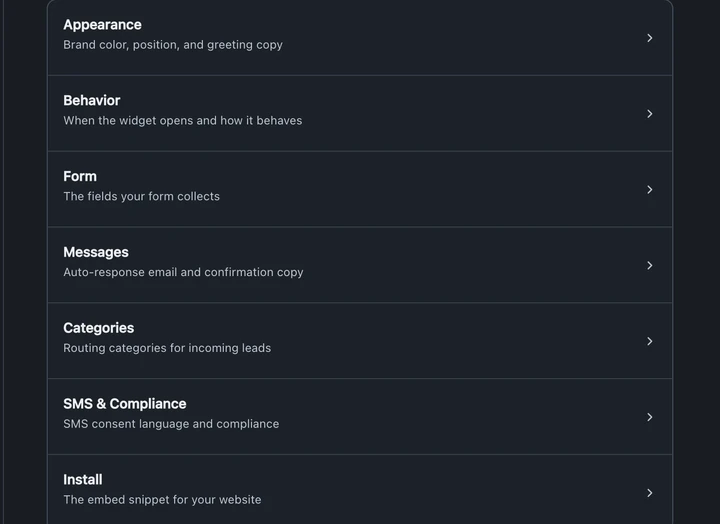
Section titled “Configuring the form”The widget settings hub has seven sections covering appearance, behavior, form, messages, categories, SMS and compliance, and installation:
- Form, what you ask, in a drag-and-drop builder: fields, steps, dropdowns, photo uploads. Keep required fields minimal; friction kills conversion.
- Appearance, brand color, greeting, business name and logo, with a live preview.
- Auto-response, the instant reply a new lead receives.
- Teaser & auto-open, an optional invitation message, or open the widget automatically after a delay.
- Spam protection, Cloudflare Turnstile bot-checking, rate limits, and the list of domains allowed to embed your widget.
What happens to a submission
Section titled “What happens to a submission”- Submissions pass bot and rate-limit checks before a lead is created.
- The lead is created in your pipeline, you get notified.
- The configured auto-response acknowledges the request and explains the next step. Check its delivery in the lead’s message history.
- Follow-up sequences take it from there and pause when the lead replies. The reply setting determines whether they resume after staff answer.
Abandoned forms still count
Section titled “Abandoned forms still count”If a visitor enters contact info and clicks Continue but never finishes, BenchKey saves their progress as a lead, and the widget says so in plain fine print right beside the button. A half-finished form is a customer who almost called, chase it. Visitors who type but never continue past a step stay private: nothing they entered leaves their browser.
After hours
Section titled “After hours”The widget knows your business hours. After close it switches to “leave a message” wording and sets an honest expectation for when you reply, no fake “we’re online!” at 2 AM.
From lead to ticket
Section titled “From lead to ticket”When the customer commits, convert the lead to a ticket in one click. Contact info and the full conversation history carry over, the bench sees everything the lead said.
Testing
Section titled “Testing”After installing, submit a test lead from your own site and watch it arrive. Check the auto-response lands in your inbox (and not in spam) before you rely on it.